
The Shopify Plus Implementation Timeline and Process
On this page
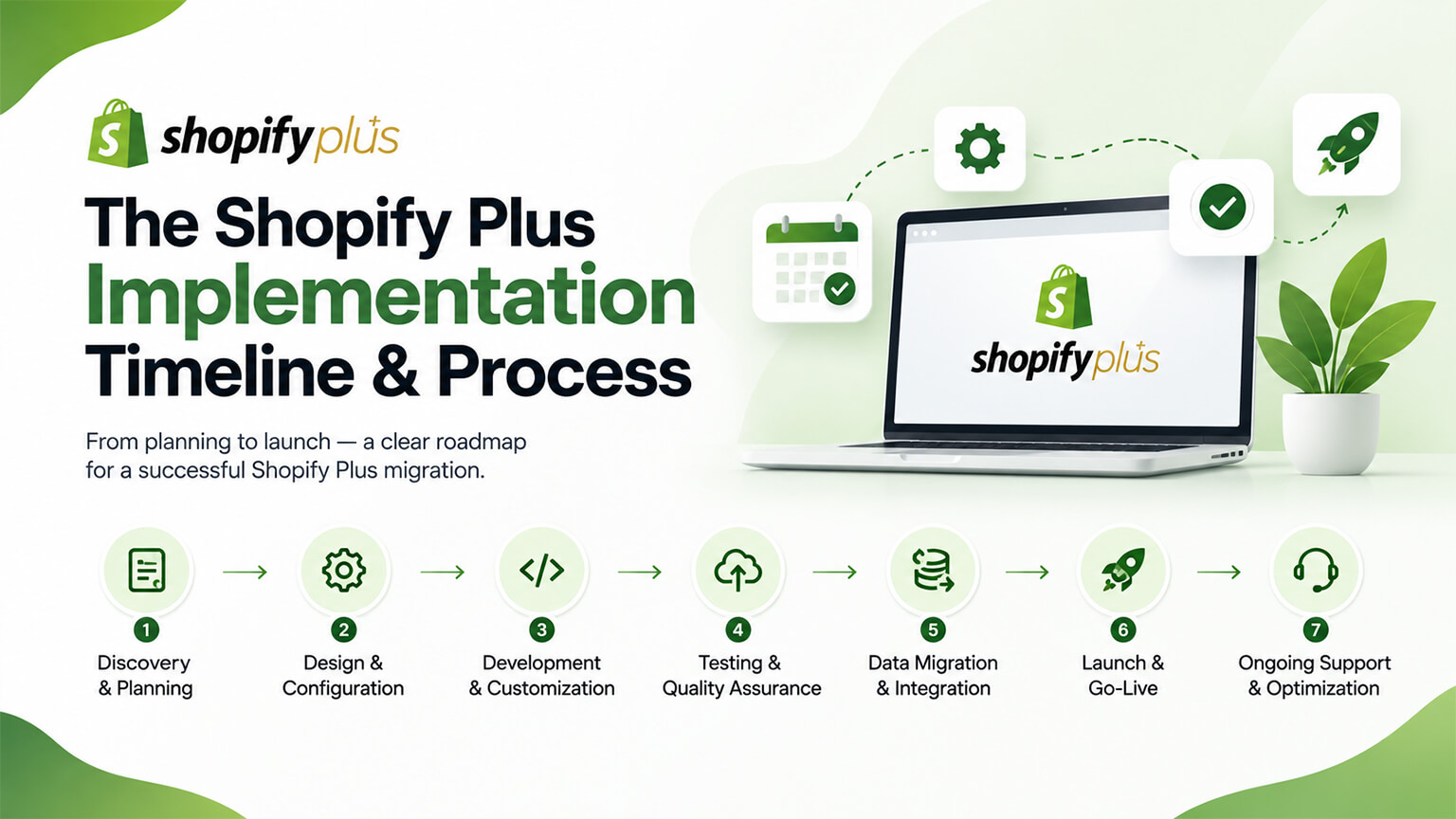
Moving to Shopify Plus — whether upgrading from standard Shopify, migrating from another platform, or launching a new Plus store — isn’t just flipping a switch; it’s an implementation project, especially if you’re leveraging Plus’s capabilities (checkout customisation, native B2B, custom logic via Functions, integrations, as those discussions cover) or migrating a significant store. Understanding the implementation timeline and process — the phases, what’s involved, and how long it realistically takes — helps you plan, resource, and manage a Plus implementation well (avoiding the underestimation and poor planning that cause problems). This piece covers the Shopify Plus implementation timeline and process: what the implementation involves, the phases, realistic timelines, and how to manage it well. (This connects to the when-to-upgrade, choosing-a-Plus-agency, and migration discussions; this focuses on the implementation timeline and process. Note: timelines vary widely by scope and complexity; this covers the general picture and phases.)
This piece covers what a Plus implementation involves, the typical phases and process, realistic timelines (and what drives them), and how to manage the implementation well. Because moving to Plus is a project, and understanding the timeline and process helps you plan and manage it well. Let me walk through it.
What a Plus implementation involves
A Plus implementation involves more than switching plans — its scope depends on what you’re doing. More than a plan switch — moving to Plus isn’t just upgrading the plan (though that’s part of it); it’s implementing the store on Plus and leveraging Plus’s capabilities, which is a project (the scope depending on what you’re doing) — so it’s an implementation, not a switch. Scope varies widely — the scope varies widely: upgrading an existing Shopify store to Plus (perhaps to leverage Plus features) is different from migrating from another platform to Plus (a full migration, as the migration discussions cover) or building a new Plus store or a significant rebuild — so “Plus implementation” spans a range of scopes (from a lighter upgrade to a major build/migration). Leveraging Plus capabilities — much of the implementation work is leveraging Plus’s capabilities (checkout customisation via extensibility, native B2B setup, custom logic via Functions, integrations, expansion stores, as those discussions cover) — implementing the Plus-specific features you’re adopting (which is where much of the effort is, versus just being on Plus). Migration (if applicable) — if migrating (from another platform or significantly rebuilding), the implementation includes the migration work (data, design, redirects, as the migration discussions cover), a significant part of the project. Integrations — implementing integrations (ERP, systems, as the ERP discussion covers), often part of a Plus implementation (Plus stores often have significant integrations) — integration work. Development and setup — the development and setup (theme/build, Plus features, configuration, testing, as the store-setup and testing discussions cover) — the core implementation work. And it’s a real project — overall, a Plus implementation is a real project (with phases, work, and a timeline), especially for significant scopes (migration, major build, extensive Plus-feature adoption, integrations) — not a quick switch. So a Plus implementation involves more than a plan switch — implementing the store on Plus and leveraging Plus’s capabilities, with scope varying widely (lighter upgrade to major build/migration), including leveraging Plus features, migration (if applicable), integrations, and development/setup — a real project. So understand a Plus implementation as a project (scope-dependent), which the next section covers the phases of. So moving to Plus is an implementation project whose scope depends on what you’re doing.
The typical phases and process
A Plus implementation typically follows a project process with phases (adapting to the scope). Planning and scoping — start with planning and scoping: defining what you’re doing (upgrade, migration, build, Plus features to adopt), the requirements, the scope, and the plan (as the planning and briefing discussions cover) — the foundation (a clear plan for the implementation). Discovery and design — discovery (understanding your needs, current state, requirements) and design (the store design, architecture, and how Plus features and integrations will work, as the architecture discussion covers) — planning the build. Development and configuration — the core development and configuration: building/setting up the store, theme, Plus features (checkout customisation, B2B, Functions, as those discussions cover), integrations, and configuration (as the store-setup discussion covers) — the main implementation work. Migration (if applicable) — if migrating, the migration work (data migration, redirects, as the migration discussions cover) — a significant phase for migrations. Integration implementation — implementing and testing integrations (ERP, systems, as the ERP and webhooks discussions cover), connecting Plus to your systems. Testing and QA — thorough testing and QA (functionality, Plus features, integrations, checkout, everything, as the testing and pre-launch discussions cover), especially critical for a significant store (ensuring it all works) — a key phase (test thoroughly before launch). Launch — launching (going live on Plus, with the pre-launch essentials and redirects if migrating, as those discussions cover), carefully (a significant launch) — the go-live. And post-launch and optimisation — post-launch monitoring, fixing issues, and beginning optimisation (as the maintenance and CRO discussions cover) — after launch. So the typical phases are planning and scoping, discovery and design, development and configuration (leveraging Plus features), migration (if applicable), integration implementation, testing and QA, launch, and post-launch/optimisation — a project process adapting to the scope. So a Plus implementation follows a project process with these phases (scaled to the scope), from planning through launch and post-launch. So understand the phases (planning, design, development, migration/integration, testing, launch, post-launch) to plan and manage the implementation. The next section covers realistic timelines.
Realistic timelines (and what drives them)
Plus implementation timelines vary widely by scope and complexity, so understanding what drives them helps set realistic expectations. Timelines vary widely — Plus implementation timelines range from relatively quick (a lighter upgrade leveraging some Plus features) to lengthy (a major migration, build, or extensive implementation) — from weeks to many months depending on scope — so there’s no single timeline (it depends on what you’re doing). What drives the timeline: scope and complexity — the main driver is scope and complexity: a simple upgrade is quicker; a full migration from another platform, a major rebuild, extensive Plus-feature adoption (checkout customisation, B2B, custom Functions), and significant integrations take much longer — so the more you’re doing (and the more complex), the longer. Migration adds time — migration (from another platform, with data, design, redirects) adds significant time (a migration is a substantial project) — so migrations lengthen the timeline. Plus-feature implementation adds time — implementing Plus features (checkout customisation, B2B, Functions, as those discussions cover) adds time (developing and testing them) — so extensive Plus-feature adoption lengthens it. Integrations add time — significant integrations (ERP, systems, as the ERP discussion covers) add time (integration work is substantial) — so integrations lengthen it. Customisation and build add time — extensive customisation or a custom build (versus a lighter setup) adds time — so more custom work lengthens it. Testing takes time — thorough testing (essential for a significant store) takes time (don’t rush it) — a necessary part of the timeline. Resources and capability affect it — the resources and capability (your team or agency, as the choosing-a-Plus-agency discussion covers) affect the timeline (a capable, resourced team/agency executes efficiently) — so resourcing affects duration. And don’t underestimate — a common mistake is underestimating the timeline (a significant Plus implementation takes longer than expected), so plan realistically (allowing for the scope, complexity, and thorough testing) — avoiding the underestimation that causes rushed launches and problems. So realistic Plus implementation timelines vary widely (weeks to many months) driven by scope and complexity (simple upgrade to major migration/build), with migration, Plus-feature implementation, integrations, customisation, and testing all adding time, affected by resources/capability — and shouldn’t be underestimated (plan realistically for the scope). So set realistic timeline expectations based on your scope (simple upgrade = quicker; major migration/build/implementation = many months), planning realistically. The next section covers managing the implementation well. So Plus implementation timelines depend heavily on scope, ranging widely, and shouldn’t be underestimated.
How to manage the implementation well
Managing a Plus implementation well involves good planning, resourcing, and execution. Plan and scope thoroughly — plan and scope the implementation thoroughly (what you’re doing, requirements, phases, timeline, as the planning discussion covers), since good planning avoids problems (scope creep, underestimation, poor execution) — the foundation of a well-managed implementation. Set realistic timelines — set realistic timelines (based on the scope and complexity, not underestimating, allowing for thorough testing), so the implementation isn’t rushed (which causes problems) — realistic planning. Use the right partner/team — use a capable, experienced Plus partner or team (as the choosing-a-Plus-agency and team discussions cover) — a Plus implementation (especially significant) benefits from experienced execution (Plus expertise, avoiding mistakes), so the right partner/team is key (the biggest factor in success). Resource it adequately — resource the implementation adequately (budget, team/agency, time), since a significant implementation needs adequate resources (under-resourcing causes problems) — proper resourcing. Manage the phases and process — manage the implementation through its phases (planning, design, development, migration/integration, testing, launch, post-launch), with good project management (as covered) — organised execution. Prioritise testing — prioritise thorough testing (functionality, Plus features, integrations, checkout, everything, as the testing discussions cover), especially before launch, since a significant store must work correctly (rushing testing causes launch problems) — don’t skimp on testing. Handle migration carefully (if applicable) — if migrating, handle it carefully (data, redirects, preserving SEO, as the migration discussions cover), since migration is high-stakes (getting it wrong loses data/SEO) — careful migration. Plan the launch — plan the launch carefully (pre-launch essentials, redirects, timing, as those discussions cover), so the go-live is smooth (a significant launch) — good launch management. And plan for post-launch — plan for post-launch (monitoring, fixing issues, optimisation, as the maintenance and CRO discussions cover), since the work continues after launch — post-launch management. So manage a Plus implementation well by planning and scoping thoroughly, setting realistic timelines (not underestimating), using a capable experienced Plus partner/team (the key factor), resourcing it adequately, managing the phases and process, prioritising thorough testing, handling migration carefully (if applicable), planning the launch, and planning for post-launch. The keys are good planning and realistic timelines, using an experienced Plus partner/team, adequate resourcing, and thorough testing — managing the implementation as the real project it is. So plan and manage the Plus implementation as a real project (good planning, realistic timelines, experienced partner, resourcing, testing) — executing it well. So a Plus implementation, managed well as a project with good planning, an experienced partner, and thorough testing, goes smoothly. So managing a Plus implementation well means treating it as the project it is — planned, resourced, expertly executed, and thoroughly tested.
A worked example: two implementations, two timelines
Picture two brands moving to Plus, and how differently the projects look. Brand A is upgrading an existing, well-built Shopify store to Plus mainly to adopt a couple of Plus features — say, some checkout customisation and native B2B for a new wholesale line. Its implementation is on the lighter end: plan and scope what it’s adopting, design the B2B setup and checkout customisation, develop and configure those Plus features, test them thoroughly, and launch — a matter of weeks, because it’s building on an existing solid store and adopting a contained set of features. Brand B is migrating from another platform to Plus with a full rebuild, extensive Plus-feature adoption (checkout extensibility, custom Functions for discount and shipping logic, native B2B), and significant integrations (an ERP, a subscription platform). Its implementation runs through every phase at depth — planning and discovery, design and architecture, a substantial build, a full data migration with redirects, integration implementation, extensive testing across everything, a carefully-managed launch, and post-launch work — a project of many months, because the scope is large and complex.
Both are “moving to Plus,” but the timelines differ by an order of magnitude because the scope does — which is exactly the point: there’s no single Plus-implementation timeline, only the timeline your scope and complexity dictate. The instructive contrast is also in the risk: Brand A’s contained project is lower-risk and easier to manage, while Brand B’s must be planned realistically, resourced properly, executed by an experienced Plus partner, and tested exhaustively (especially the migration and integrations, which are high-stakes), or it will slip and hit problems. Both brands succeed by treating their move as the project it is and planning honestly for its actual scope — Brand A not over-engineering a simple upgrade, Brand B not underestimating a major migration. The common mistake that hurts both is underestimating the timeline and under-resourcing the work; the common success factor is realistic planning plus experienced execution matched to the true scope. So when you plan your own Plus move, first be honest about which end of this spectrum you’re on — and plan, resource, and time it accordingly.
The bottom line
Moving to Shopify Plus — whether upgrading from standard Shopify, migrating from another platform, or launching a new Plus store — isn’t just flipping a switch; it’s an implementation project, especially if you’re leveraging Plus’s capabilities (checkout customisation, native B2B, custom logic via Functions, integrations) or migrating a significant store. A Plus implementation involves more than a plan switch: implementing the store on Plus and leveraging its capabilities, with the scope varying widely (from a lighter upgrade leveraging some Plus features to a full migration, major rebuild, or extensive implementation with significant integrations). Much of the work is leveraging Plus’s capabilities (checkout customisation, native B2B setup, custom Functions, integrations, expansion stores), plus migration work (if applicable), integrations, and development and setup — a real project. It typically follows a project process with phases: planning and scoping (defining what you’re doing, the requirements, and the plan), discovery and design (needs, requirements, store design and architecture, how Plus features and integrations will work), development and configuration (building and setting up the store, theme, Plus features, integrations — the main work), migration (if applicable — data, redirects, preserving SEO), integration implementation, thorough testing and QA (functionality, Plus features, integrations, checkout — critical for a significant store), launch (going live carefully with the pre-launch essentials), and post-launch monitoring and optimisation. Realistic timelines vary widely — from weeks for a lighter upgrade to many months for a major migration, build, or extensive implementation — driven mainly by scope and complexity, with migration, Plus-feature implementation, integrations, customisation, and thorough testing all adding time, and affected by your resources and capability; a common mistake is underestimating the timeline, so plan realistically. Manage the implementation well by planning and scoping thoroughly (good planning avoids scope creep, underestimation, and poor execution), setting realistic timelines (not rushing, allowing for thorough testing), using a capable, experienced Shopify Plus partner or team (the biggest factor in success — Plus expertise and experienced execution avoid mistakes), resourcing it adequately, managing it through its phases with good project management, prioritising thorough testing (especially before launch, since a significant store must work correctly), handling any migration carefully (data, redirects, SEO — high-stakes), planning the launch carefully, and planning for post-launch (monitoring, fixing issues, optimisation). The keys are good planning and realistic timelines, an experienced Plus partner or team, adequate resourcing, and thorough testing. So treat a Plus implementation as the real project it is — planned, resourced, expertly executed, thoroughly tested, and managed through its phases — rather than underestimating it as a simple switch. Done this way, a Plus implementation goes smoothly and delivers the Plus capabilities and store you’re moving to; underestimated or poorly managed, it risks rushed launches, problems, and disappointment. So plan and resource your Plus implementation realistically, use an experienced Plus partner, and manage it as a project — and you’ll move to Plus successfully.
Frequently asked questions
Is moving to Shopify Plus just a plan upgrade, or a bigger project?
It’s a bigger project, not just flipping a switch — especially if you’re leveraging Plus’s capabilities or migrating a significant store. While upgrading the plan is part of it, a Plus implementation means actually implementing your store on Plus and leveraging its capabilities (checkout customisation, native B2B, custom logic via Functions, integrations, expansion stores), which is a real project. The scope varies widely: upgrading an existing Shopify store to Plus to leverage some Plus features is lighter than migrating from another platform to Plus (a full migration), building a new Plus store, or doing a major rebuild with extensive Plus-feature adoption and significant integrations. Much of the work is in implementing the Plus-specific features you’re adopting, plus any migration, integrations, and development and setup. So plan for a Plus move as an implementation project with phases, work, and a realistic timeline — the size depending on what you’re doing — rather than underestimating it as a quick plan switch.
What are the phases of a Shopify Plus implementation?
A Plus implementation typically follows a project process, scaled to the scope: planning and scoping (defining what you’re doing — upgrade, migration, build, and which Plus features to adopt — plus the requirements and plan); discovery and design (understanding your needs and current state, and designing the store, architecture, and how Plus features and integrations will work); development and configuration (the core work — building and setting up the store, theme, Plus features like checkout customisation and native B2B, integrations, and configuration); migration (if applicable — migrating data, setting up redirects, preserving SEO); integration implementation (connecting and testing integrations like ERP and other systems); thorough testing and QA (functionality, Plus features, integrations, checkout, and everything — critical for a significant store); launch (going live carefully, with the pre-launch essentials and redirects if migrating); and post-launch (monitoring, fixing issues, and beginning optimisation). Not every implementation includes every phase to the same degree, but this process captures the typical shape of a Plus implementation from planning through launch and beyond.
How long does a Shopify Plus implementation take?
It varies widely by scope and complexity — from a few weeks for a lighter upgrade that leverages some Plus features, to many months for a major migration from another platform, a significant rebuild, or an extensive implementation with lots of Plus-feature adoption and integrations. The main driver is what you’re doing: a simple upgrade is quick, while migration (data, design, redirects), implementing Plus features (checkout customisation, B2B, custom Functions), significant integrations (ERP, systems), extensive customisation or a custom build, and thorough testing all add substantial time. Your resources and capability also affect it — a capable, experienced team or Plus partner executes efficiently. A common and costly mistake is underestimating the timeline, since a significant Plus implementation takes longer than people expect, which leads to rushed launches and problems. So set realistic expectations based on your specific scope, allow adequate time for thorough testing, and plan conservatively rather than assuming it’ll be quick.
How do I manage a Shopify Plus implementation well?
Treat it as the real project it is, and manage it accordingly. Plan and scope thoroughly upfront (what you’re doing, the requirements, phases, and timeline), since good planning avoids scope creep, underestimation, and poor execution. Set realistic timelines based on your scope and complexity, not underestimating and allowing for thorough testing, so the implementation isn’t rushed. Use a capable, experienced Shopify Plus partner or team — this is the biggest factor in success, since Plus expertise and experienced execution avoid the mistakes that derail implementations. Resource the project adequately (budget, team, time), manage it through its phases with good project management, and prioritise thorough testing (functionality, Plus features, integrations, checkout) especially before launch, since a significant store must work correctly. If you’re migrating, handle it carefully (data, redirects, preserving SEO — it’s high-stakes), plan the launch carefully (pre-launch essentials, redirects, timing), and plan for post-launch (monitoring, fixing issues, and optimisation, since the work continues after go-live). The keys are good planning, realistic timelines, an experienced partner, adequate resourcing, and thorough testing.